Representative End User Clients







Representative Automation Clients







Representative Software Clients









Keywords: Business Intelligence Software, BI Software, Industrial Data Platforms, Software as a Service, SaaS, On-premises Software, Low-Code or No-Code, LCNC
When efficiency within the production process needs to be increased, industrial organizations often rely on specific software to support their operational excellence activities. We can see them using business intelligence software (BI software), industrial data platforms, or process analytics solutions.
Industrial organizations now have two different options to implement and use this software over its lifecycle. Option one is the local or on-premises installation. The second option is to use the software from a public cloud, often offered as Software as a Service (SaaS).
This Insight clarifies the advantages and disadvantages of on-premises solutions versus Software as a Service (SaaS) in the cloud from the industrial organization’s perspective. Historically, on-premises solutions prevailed. They are still initially considered due to their flexibility in meeting customer-specific requirements.

But do not forget that every software concept has specific advantages and disadvantages. These aspects must be carefully considered in each individual case:
On-premises solutions offer several advantages. Customization allows the software to integrate custom developments, making it highly tailored to specific industry requirements and operational needs. Control over data, security rules, and system performance is fully maintained. Compliance is easier to achieve, as keeping data on-site ensures no third party is involved, making it simpler to meet strict regulatory requirements. Integration with existing on-premises hardware and legacy systems is seamless.
However, there are also disadvantages. The cost is high, with significant upfront expenses for hardware, software, and implementation. Ongoing maintenance can be expensive, particularly when maintaining specific developments to customize the software. Scalability requires additional hardware investments and can be time consuming. Updates and patches must be applied manually, which can lead to downtime and require IT resources. Specific developments can complicate the update process to ensure compatibility with new software versions. Flexibility is limited in terms of remote access and mobility.
SaaS in the Cloud offers other benefits. It is cost effective, with lower upfront costs due to subscription-based pricing and a reduced need for in-house IT resources. Additionally, SaaS benefits from infrastructure mutualization, leading to lower hosting costs. Scalability is another advantage, as it is easy to scale up or down based on needs without significant investments in hardware, thanks to cloud technologies. Automatic updates and patches ensure that the latest features and security measures are always in place. In the case of SaaS, most customization is achieved through configuration, allowing for seamless updates without the need for custom developments. Accessibility is also a key benefit, as SaaS can be accessed from anywhere with an internet connection, enhancing flexibility and remote work capabilities.
But there are some downsides to think about. SaaS may offer less customization compared to on-premises solutions, as custom developments are seldom possible. On the other hand, the SaaS approach often provides more No-Code/Low-Code configuration capabilities than on-premises solutions. Control over data and security protocols is also reduced, as there is a dependence on the service provider for availability, confidentiality, and security. Meeting certain regulatory requirements can be challenging due to data being stored off-site and the need to integrate third parties into the compliance process. Finally, SaaS is reliant on stable internet connections for access, and downtime or slow connections can impact operations.
The decision between on-premises and SaaS depends on the industrial organization's specific requirements, financial constraints, regulatory environment, and scaling objectives. For organizations requiring extensive customization and control, on-premises may be more appropriate. For those seeking cost-effective, scalable, and adaptable solutions, SaaS in the cloud could be a more suitable option.
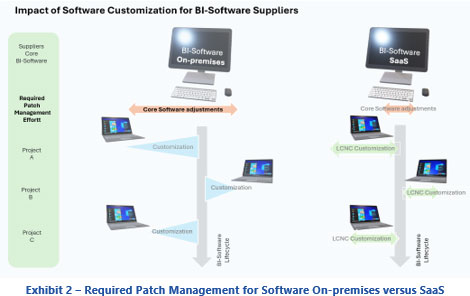
Highly customized on-premises solutions can be challenging for organizations and software providers. SaaS offers limited customization, managed centrally in the cloud, resulting in various benefits.
Centralized maintenance and updates ensure consistency by making sure all users benefit from the latest updates and features, thereby reducing version fragmentation. Streamlined support is another advantage, as the support team can focus on a standardized system, leading to faster resolution times and more effective help.
In terms of long-term viability, centralized and limited customization ensures future proofing by allowing the system to evolve uniformly with industry standards and technological advancements. This approach also promotes cost efficiency by reducing the long-term costs associated with maintaining numerous customized versions of the software.
In conclusion, a Software as a Service (SaaS) model with centralized and managed customization offers a more streamlined, scalable, and cost-effective solution for industrial organizations. Although this may involve some reduction in the level of customization, the overall benefits in terms of efficiency, maintenance, and long-term sustainability can be significant.
SaaS presents a scalable and cost-effective solution. How can customer-specific requirements be better implemented within SaaS? Adding Low-Code or No-Code (LCNC) capabilities to a SaaS platform can bridge the customization gap between SaaS and on-premises software.
Embedding Low-Code or No-Code (LCNC) in SaaS offers numerous benefits. It empowers business operations, allowing operators with limited IT skills to easily design and implement their own customizations, from process data collection to dashboard visualizations. This flexibility enables operators to adapt the software to their specific needs without waiting for software updates or vendor assistance. Efficiency is also enhanced, as it reduces the time and resources required for customizations, enabling faster implementation of changes. Cost savings are achieved by minimizing the need for extensive development resources, thereby reducing costs for both the operator and the software supplier. Maintenance becomes simpler, as the absence of specific development reduces the burden of deploying software updates.
Potential customization areas with LCNC include data collection, where users can customize data collection, storage, and processing methods and parameters to fit specific processes and requirements. Dashboards and visualizations can be created to display the most relevant metrics and insights. Custom workflows can be designed to automate specific tasks and processes, and tailored reports can be generated to meet the specific needs of different stakeholders.
While they excel at simple and moderate customizations, they might struggle with complex or highly specialized requirements that need deep technical expertise and custom coding. Because they use a lot of abstraction and pre-built components, performance can be less optimized compared to hand-coded solutions. Some may face scalability issues, particularly if they are not designed to handle many users or high transaction volumes. However, more and more providers are implementing state-of-the-art infrastructure designs to reduce this risk. Integration with existing systems, databases, and third-party applications can be difficult, especially if those systems are on-premises, highly customized, or use proprietary technologies. This challenge also exists for on-premises solutions.
Low-Code, No-Code (LCNC) solutions allow those with limited technical skills to contribute to software development, though they might not suit all projects. Complex applications may still need traditional methods. A balanced approach combines LCNC for simple tasks and custom development for complex ones. Operators can use the software to display their own graphs and KPIs, optimizing processes and increasing digital acceptance, making these solutions more appealing to employers.

ARC Advisory Group clients can view the complete report at the ARC Client Portal.
Contact Us if you would like to speak with the author.
Obtain more ARC In-depth Research Market Analysis.